

Beautiful WordPress tables, the easy way.
Build tables like you'd build a spreadsheet. Click in, type, paste from Excel, drag rows around. Your visitors get clean, searchable, mobile-friendly tables on the front end. Works with Gutenberg, Elementor, Divi, Bricks, and every other major builder.
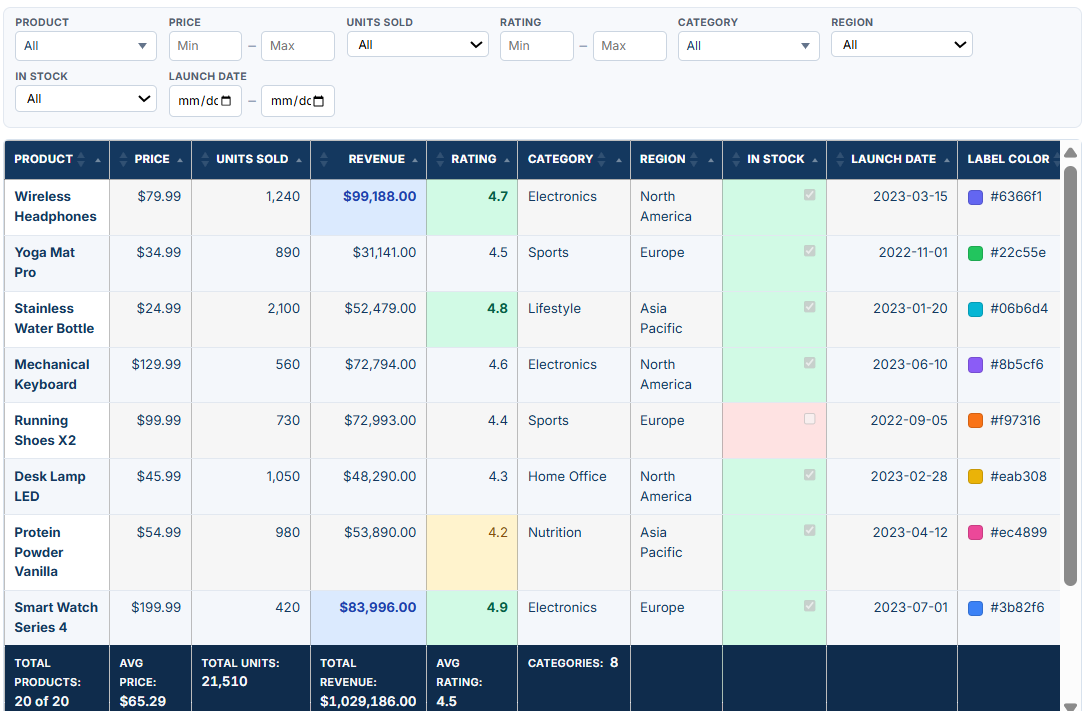
Tables that look great on every device
Phones, tablets, laptops, big monitors. Your table reshapes itself for whatever your visitor is using. Sticky headers, click-to-sort columns, a search box, and pagination, all out of the box.
| Product | Price | Units Sold | Total Sold | Rating | Category | Region | In Stock | Launch Date | Label Color |
|---|---|---|---|---|---|---|---|---|---|
| Wireless Headphones | $79.99 | 1,240 | $99,187.60 | ★★★★★ | Electronics | North America | 2023-03-15 | #6366f1 | |
| Yoga Mat Pro | $34.99 | 960 | $33,590.40 | ★★★★★ | Sports | Europe | 2022-11-01 | #22c55e | |
| Stainless Water Bottle | $24.99 | 2,100 | $52,479.00 | ★★★★★ | Lifestyle | Asia Pacific | 2023-01-20 | #06b6d4 | |
| Mechanical Keyboard | $129.99 | 560 | $72,794.40 | ★★★★★ | Electronics | North America | 2023-06-10 | #8b5cf6 | |
| Running Shoes X2 | $58.50 | 730 | $42,705.00 | ★★★★★ | Sports | Europe | 2022-09-05 | #f97316 | |
| Desk Lamp LED | $116.82 | 1,050 | $122,661.00 | ★★★★★ | Home Office | North America | 2023-02-28 | #eab308 | |
| Protein Powder Vanilla | $54.99 | 980 | $53,890.20 | ★★★★★ | Nutrition | Asia Pacific | 2023-04-12 | #ec4899 | |
| Smart Watch Series 4 | $199.99 | 420 | $83,995.80 | ★★★★★ | Electronics | Europe | 2023-07-01 | #3b82f6 | |
| Resistance Bands Set | $19.99 | 3,200 | $63,968.00 | ★★★★★ | Sports | North America | 2022-12-15 | #10b981 | |
| Coffee Grinder Pro | $89.99 | 310 | $27,896.90 | ★★★★★ | Kitchen | Asia Pacific | 2023-05-22 | #f43f5e | |
| Laptop Stand Aluminum | $39.99 | 1,420 | $56,785.80 | ★★★★★ | Home Office | Europe | 2023-01-08 | #a855f7 | |
| Foam Roller Recovery | $29.99 | 760 | $22,792.40 | ★★★★★ | Sports | North America | 2022-10-30 | #14b8a6 | |
| Air Purifier Mini | $149.99 | 290 | $43,497.10 | ★★★★★ | Home Office | Asia Pacific | 2023-03-03 | #f59e0b | |
| Bamboo Cutting Board | $22.99 | 1,800 | $41,382.00 | ★★★★★ | Kitchen | Europe | 2022-08-18 | #84cc16 | |
| Posture Corrector | $27.99 | 940 | $26,310.60 | ★★★★★ | Lifestyle | North America | 2023-06-25 | #fb923c | |
| Portable Blender | $49.99 | 1,100 | $54,989.00 | ★★★★★ | Kitchen | Europe | 2023-02-14 | #38bdf8 | |
| Blue Light Glasses | $32.99 | 1,650 | $54,433.50 | ★★★★★ | Lifestyle | Asia Pacific | 2023-04-04 | #c084fc | |
| Electric Toothbrush | $69.99 | 870 | $60,891.30 | ★★★★★ | Health | North America | 2022-11-20 | #34d399 | |
| Camping Lantern Solar | $44.99 | 520 | $23,394.80 | ★★★★★ | Outdoors | Europe | 2023-05-11 | #fb7185 | |
| Standing Desk Mat | $55.99 | 680 | $38,073.20 | ★★★★★ | Home Office | Asia Pacific | 2023-07-15 | #a3e635 | |
Pro highlights
Four reasons customers upgrade to Pro
The features people tell us made the upgrade worth it. All included in Pro from day one.
Real visual table editor
Edit your table the way you'd edit a spreadsheet. Drag rows around, paste a range from Excel or Google Sheets, find and replace, undo whenever you mess up. Pro lets editors update cells directly on the live page.
Excel & PDF export
Your table downloads as a clean Excel file with formatting preserved, or as a branded PDF. (Excel and CSV import are free — bring data in, send it back out.)
AI table assistant
Ask the assistant to tidy a column for you. "Make these dates consistent." "Title-case all the names." "Summarise this row in 12 words." Bring your own Claude (Anthropic) or OpenAI API key.
Live data sources
Point a table at a Google Sheet, a remote CSV, or a JSON feed and it refreshes on a schedule. Update the source, the table updates itself. You can even manage your WooCommerce data in MMTable.
Free vs. Pro Features
| Feature | Free | Pro |
|---|---|---|
| EDITOR & DATA ENTRY | ||
| Visual spreadsheet editor (keyboard nav, inline edit) | ✓ | ✓ |
| Paste from Excel / Google Sheets | ✓ | ✓ |
| Undo / redo, multi-cell select | ✓ | ✓ |
| Merged cells | ✓ | ✓ |
| Smooth editing on large tables (virtualized grid) | ✓ | ✓ |
| CELL TYPES | ||
| Text | ✓ | ✓ |
| Number, Currency, Percent | ✓ | ✓ |
| Date (custom formats) | ✓ | ✓ |
| Dropdown (select list) | ✓ | ✓ |
| Checkbox (with display styles) | ✓ | ✓ |
| Image | — | ✓ |
| Color swatch | — | ✓ |
| Rich text / HTML | — | ✓ |
| Link | — | ✓ |
| Button | — | ✓ |
| STYLING & DESIGN | ||
| Per-cell colors, bold / italic / alignment | ✓ | ✓ |
| Color schemes & professional style presets | ✓ | ✓ |
| Header row, header column & group rows | ✓ | ✓ |
| Sticky header, first column & footer | ✓ | ✓ |
| Conditional formatting (color rules) | — | ✓ |
| Badge pills | — | ✓ |
| Progress bars | — | ✓ |
| Star ratings | — | ✓ |
| Featured “Pop” column | — | ✓ |
| FRONT-END TABLE | ||
| Live search | ✓ | ✓ |
| Sortable columns | ✓ | ✓ |
| Pagination | ✓ | ✓ |
| Responsive / mobile friendly | ✓ | ✓ |
| Large-table server-side processing (AJAX paging) | ✓ | ✓ |
| Per-column filters (dropdown, multi-select, text, number & date range, checkbox) | — | ✓ |
| Footer totals | Count only | Sum, Average, Min, Max, Median, Std dev, Weighted avg, Unique, Row count |
| DATA & AUTOMATION | ||
| External data sources — CSV, JSON, Google Sheets (auto-refresh) | — | ✓ |
| Spreadsheet formulas (=A1*B1) | — | ✓ |
| Charts & graphs from your data | — | ✓ |
| AI table assistant | — | ✓ |
| Saved views | — | ✓ |
| EXPORT & EMBEDDING | ||
| Shortcode embed (use anywhere) | ✓ | ✓ |
| CSV export | ✓ | ✓ |
| Copy & Print | ✓ | ✓ |
| Excel (XLSX) export | — | ✓ |
| PDF export | — | ✓ |
| Full filtered-set export (server-side) | — | ✓ |
From spreadsheet to charts, filters, and views
Pro turns a finished table into more than a grid. Generate charts from the data, add per-column filters (dropdown, multi-select, text, number and date range), and present rows as cards, galleries, or lists with saved views.
Conditional formatting colours rows and cells by rule, and visual cell types — badge pills, progress bars, star ratings, and a featured "Pop" column — make the numbers read at a glance.
| Price | Units Sold | |
|---|---|---|
| Wireless Headphones | 79.99 | 1240 |
| Yoga Mat Pro | 34.99 | 960 |
| Stainless Water Bottle | 24.99 | 2100 |
| Mechanical Keyboard | 129.99 | 560 |
| Running Shoes X2 | 0 | 730 |
| Desk Lamp LED | 116.82 | 1050 |
| Protein Powder Vanilla | 54.99 | 980 |
| Smart Watch Series 4 | 199.99 | 420 |
| Resistance Bands Set | 19.99 | 3200 |
| Coffee Grinder Pro | 89.99 | 310 |
| Laptop Stand Aluminum | 39.99 | 1420 |
| Foam Roller Recovery | 29.99 | 760 |
| Air Purifier Mini | 149.99 | 290 |
| Bamboo Cutting Board | 22.99 | 1800 |
| Posture Corrector | 27.99 | 940 |
| Portable Blender | 49.99 | 1100 |
| Blue Light Glasses | 32.99 | 1650 |
| Electric Toothbrush | 69.99 | 870 |
| Camping Lantern Solar | 44.99 | 520 |
| Standing Desk Mat | 55.99 | 680 |
Push data from anywhere
POST signed JSON to /wp-json/mm-table/v1/tables/{id}/webhook with HMAC-SHA256 in X-MMT-Signature. Works with Zapier, Make, n8n, or your own backend.
Replace the rows only, or the whole table layout. Disable the webhook with one click — the next push returns 403.
SECRET=abc123...
BODY='{"rows":[["Apple","2.99"],["Pear","3.49"]]}'
SIG=$(printf '%s' "$BODY" \
  | openssl dgst -sha256 -hmac "$SECRET" \
  | sed 's/^.* //')

curl -X POST \
  https://example.com/wp-json/mm-table/v1/tables/42/webhook \
  -H "Content-Type: application/json" \
  -H "X-MMT-Signature: sha256=$SIG" \
  -d "$BODY"
How does MMTable compare?
MMTable vs TablePress
MMTable vs wpDataTables
MMTable vs Ninja Tables
FAQs
Do I need a page builder to use MMTable?
No. MMTable works with Gutenberg, with a simple shortcode you drop into any post or page, or as a block. If you do use a page builder, we have native widgets for Elementor, Bricks, WPBakery, Beaver Builder, and Divi.
What does the AI table assistant do?
It lets you ask an assistant to clean up table data in place — reformat dates, fix capitalisation, summarise a row, and so on. You bring your own Claude (Anthropic) or OpenAI API key, so any usage is billed to your account. Pro-only.
Can I import an Excel workbook with multiple sheets?
Yes. Drop an .xlsx file onto the editor and the cells fill in automatically; multi-sheet workbooks are supported. Excel and CSV import are in the free version.
What is a live data source, and how is it refreshed?
In Pro, a table can pull its rows from a Google Sheet, a remote CSV, or a JSON feed instead of being typed by hand. It refreshes on a schedule, so when the source changes, the table follows. WooCommerce as a source is also included.
Does it work with WooCommerce?
Yes. Set the data source to WooCommerce Products and the table pulls live product data via WC_Product_Query. Filter by category, attribute, stock state. Pro only.
What's a remote data source? How is it refreshed?
Point a table at a JSON URL, a Google Sheet, or a CSV file on the web. Pro caches the response and refreshes it on a schedule you choose (hourly, daily, weekly). The proxy validates destination hosts and blocks private and loopback IPs.
How do I push data from an external tool?
Generate a webhook secret on the table's edit screen, then POST signed JSON. Disable it any time and the next push returns 403. Full guide. Pro only.
What are templates?
A saved column structure, header rows, styling, and settings — without the data. Build a layout once, apply it to any table in one click. Pro only.
Can I move a license between sites?
Do I need a page builder to use MMTable?Yes. The License page has a "License already active on another site?" toggle that transfers the seat in one click. No support ticket required.
How MMTable compares
Detailed comparisons with the other popular WordPress table plugins. We’ll tell you where each one is the better choice, too.
MMTable vs TablePress
The long-standing default. Where TablePress wins, where MMTable wins, and which one fits which project.
MMTable vs wpDataTables
The database-driven powerhouse versus the spreadsheet-first model. When each one is the right call.
MMTable vs Ninja Tables
The polished WPManageNinja option versus the spreadsheet-style editor with AI and live data.
Ready to build a table?
From $69/year for a single site. 30-day money-back, cancel any time.