

WordPress tables that sync from Google Sheets.
Point a table at a Google Sheet, a remote CSV, or a JSON feed. MMTable pulls the rows, renders a clean searchable table, and refreshes on a schedule. Update the source — the table follows. No re-import, no copy-paste.
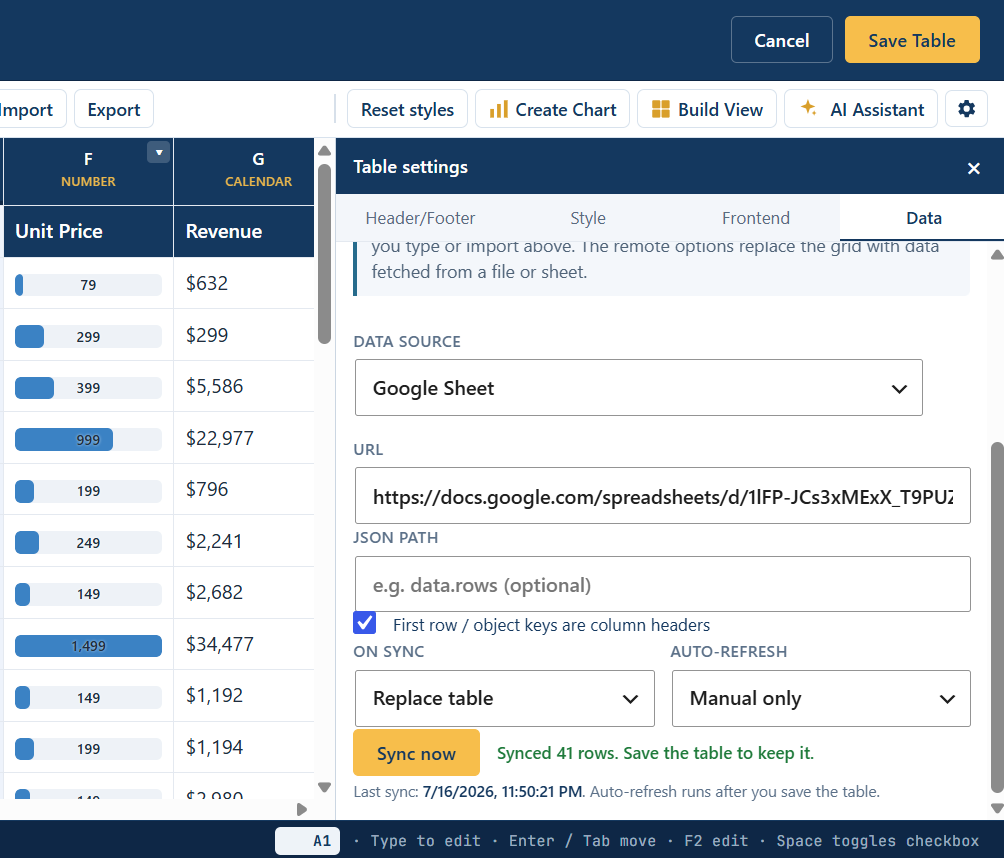
Three sources, one table
Pick whichever your data already lives in.
Google Sheets
Connect a published Sheet by URL. Edit the spreadsheet your team already uses, and the WordPress table mirrors it on the next refresh.
Remote CSV
Any CSV at a URL — an export from another system, a file on your server, a report endpoint. MMTable fetches and parses it into rows.
JSON feed
Point at a JSON URL and map the array of records into columns. Good for app data, APIs, and your own backend.
How it works
Connect the source
In the table's Data tab, choose Google Sheet, CSV URL, or JSON and paste the link. Map columns if you need to.
Set a refresh schedule
Hourly, daily, or weekly. MMTable re-fetches in the background and caches the result so the front end stays fast.
Embed anywhere
Drop into any post, page, or builder. Search, sort, pagination, and styling come along for the ride.
Live sync is a Pro feature
External data sources with scheduled refresh ship in MMTable Pro. The free plugin still imports a Google Sheet or Excel/CSV file once — drop the file on the editor and the cells fill in — you just re-import when the data changes.
Need data pushed in from Zapier, Make, or your own backend instead of pulled? Pro also includes a signed webhook API.
Put your spreadsheet on your site
From $69/year for a single site. 30-day money-back, cancel any time.