

EU CRA compliance for WordPress plugins
Done in an afternoon
Regulation context
What the EU Cyber Resilience Act actually requires from WordPress plugin developers
The EU Cyber Resilience Act (Regulation 2024/2847) applies to any "product with digital elements" placed on the EU market. That includes commercial WordPress plugins sold to even one European customer. The substantive obligations come into effect on September 11, 2026, with vulnerability disclosure under Article 13 starting earlier.
Three artifacts you have to produce, plus three controls you have to run:
- Software Bill of Materials (Annex II) — a machine-readable inventory of every dependency that ships with your plugin. CycloneDX 1.6 is the format ENISA references most often.
- Vulnerability Disclosure Policy (Article 13) — a published, machine-discoverable channel for researchers to report issues, following ISO/IEC 29147 conventions.
- EU Declaration of Conformity (Annex V) — a signed declaration identifying your product, the standards applied, and the conformity assessment route.
- Ongoing vulnerability handling (Article 14) — monitor your dependencies for new advisories, document remediation, and ship security updates without unreasonable delay.
- Incident reporting (Article 14) — report actively exploited vulnerabilities to ENISA and your customer base within 24 hours of becoming aware.
- Technical file (Article 31) — keep all of the above on hand for at least 10 years, available to market surveillance authorities on request.
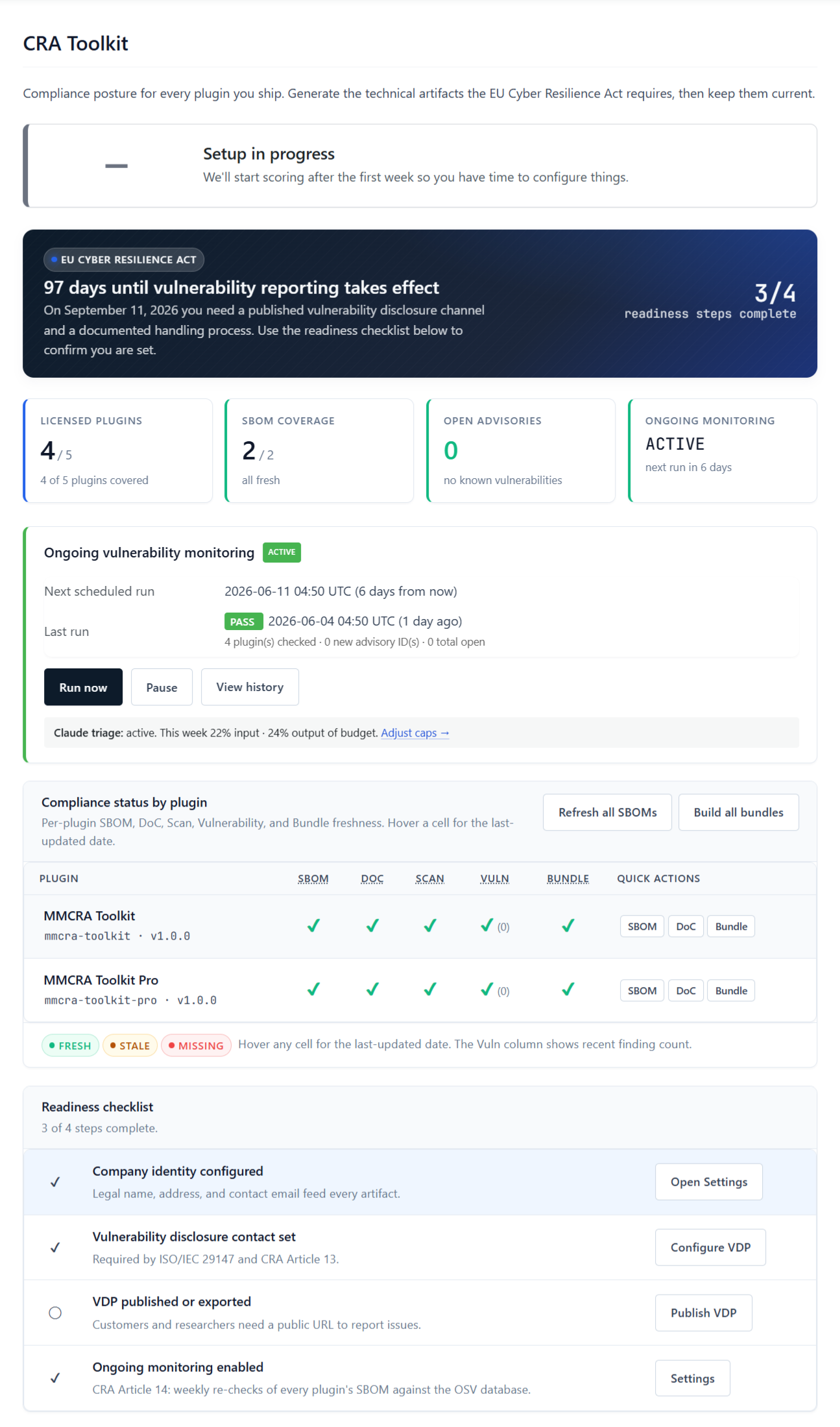
MM CRA Toolkit generates the documents and runs the controls inside your existing WordPress install. The technical file lives in wp-content/uploads/mmcra/ and exports to a single ZIP when you need to hand it to a regulator. Penalties top out at €15 million or 2.5% of global turnover, whichever is higher — which is why most commercial WordPress plugin developers can't afford to defer this work.
What the toolkit does
Eight features. One install. No external account.
Every document and control the CRA expects from a commercial WordPress plugin, produced from inside your existing WordPress admin in about five minutes.
CycloneDX 1.6 SBOM
Walks your plugin's composer.lock and package-lock.json, emits a valid CycloneDX 1.6 JSON document with purls, license fields, and supplier metadata. From any installed plugin, or any uploaded zip.
Vulnerability Disclosure Policy
Drafts a publishable VDP following ISO/IEC 29147 — reporting channel, response SLA, safe-harbor terms, scope, PGP key. Publish as a WordPress page or export to standalone HTML. CRA Article 13.
EU Declaration of Conformity
Per-product Annex V template populated from your Settings. Manufacturer identity, EU representative, applied standards, conformity assessment route. Export HTML, print to PDF, sign, file.
OSV vulnerability monitoring
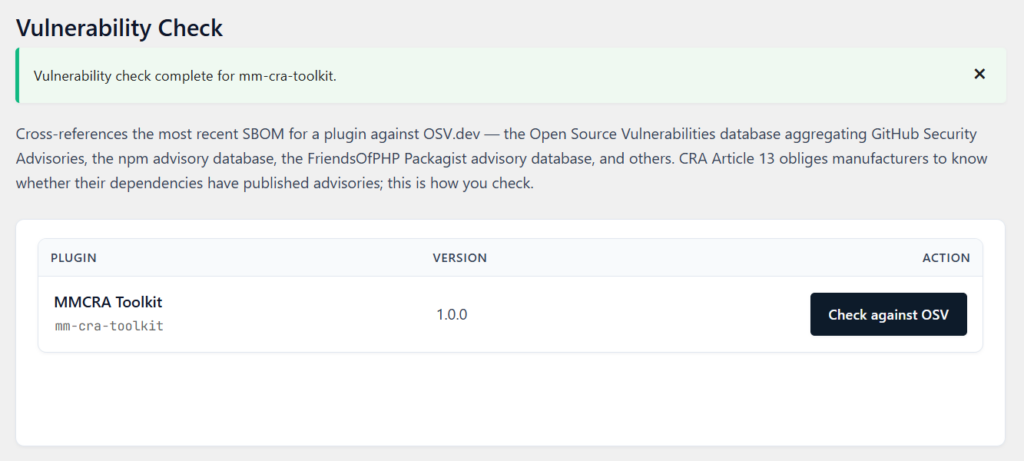
Checks every dependency in every SBOM against OSV.dev. A Pro control: weekly cron, email alerts on new advisories, and AI triage that ranks severity — priced by how many plugins you monitor. CRA Article 14.
Plugin Scanner
Static analysis of your code for risky route registrations, capability gaps, missing nonce checks, and known anti-patterns. Pro feature.
One-click Compliance Bundle
The CRA technical file as one ZIP per plugin. SBOM, VDP, signed DoC, Plugin Scanner report, audit log CSV, README manifest. License-watermarked. The artifact you hand a regulator under Article 31.
Tamper-evident audit log
Every artifact you generate is SHA-256 hashed and recorded with timestamp, user, plugin slug, and path. CSV export. Lets you prove integrity of any file after the fact.
5-step Setup Wizard
First-time configuration in under ten minutes. Manufacturer identity, EU representative, VDP, DoC defaults, monitoring. Skippable if you'd rather configure section by section.
Free vs Pro Comparison
| Feature | Free | Pro |
|---|---|---|
| Price | Free | $149/yr - 1 Plugin $399/yr - 5 Plugins $999/yr - Unlimited Plugins |
| Sites covered | Unlimited | Unlimited (one author's plugins) |
| License required | None | License key |
| Distribution | WordPress.org | mmplugs.com |
| COMPLIANCE ARTIFACTS | ||
| CycloneDX 1.6 SBOM generator | All installed plugins | All installed plugins |
| SBOM from uploaded ZIP (third-party code) | — | ✓ |
| Vulnerability Disclosure Policy editor | ✓ | ✓ |
| [mmcra_vdp] shortcode + submission form | ✓ | ✓ |
| Disclosure submissions admin page | ✓ | ✓ |
| EU Declaration of Conformity (CRA Annex V) | All installed plugins | All installed plugins |
| Declaration of Conformity HTML export | All installed plugins | All installed plugins |
| Compliance Score (0-100) | ✓ | ✓ |
| Tamper-evident audit log (SHA-256) | ✓ | ✓ |
| Audit log CSV export | ✓ | ✓ |
| 5-step Setup Wizard | ✓ | ✓ |
| Translation-ready (.pot) | ✓ | ✓ |
| MONITORING AND INCIDENT RESPONSE | ||
| OSV.dev vulnerability check | — | On-demand + weekly, per monitored plugin |
| Weekly OSV monitoring + email alerts | — | 1 / 5 / unlimited plugins by tier |
| Plugin Scanner (static analysis) | — | ✓ |
| AI-assisted advisory triage and drafting (Claude) | — | ✓ |
| Incident Center (ENISA Article 14 deadline tracking) | — | ✓ |
| Webhooks + test ping | — | ✓ |
| PDF compliance report | — | ✓ |
| One-click Compliance Bundle ZIP | — | ✓ |
| Automatic updates | via WordPress.org | Licensed auto-updater |
Inside the toolkit
Everything that comes with the plugin. Your tier sets how many plugins get weekly vulnerability monitoring: $149/year for 1, $399/year for 5, or $999/year for unlimited.
v1.0.0 · tested through WordPress 7.0 · requires PHP 7.4+
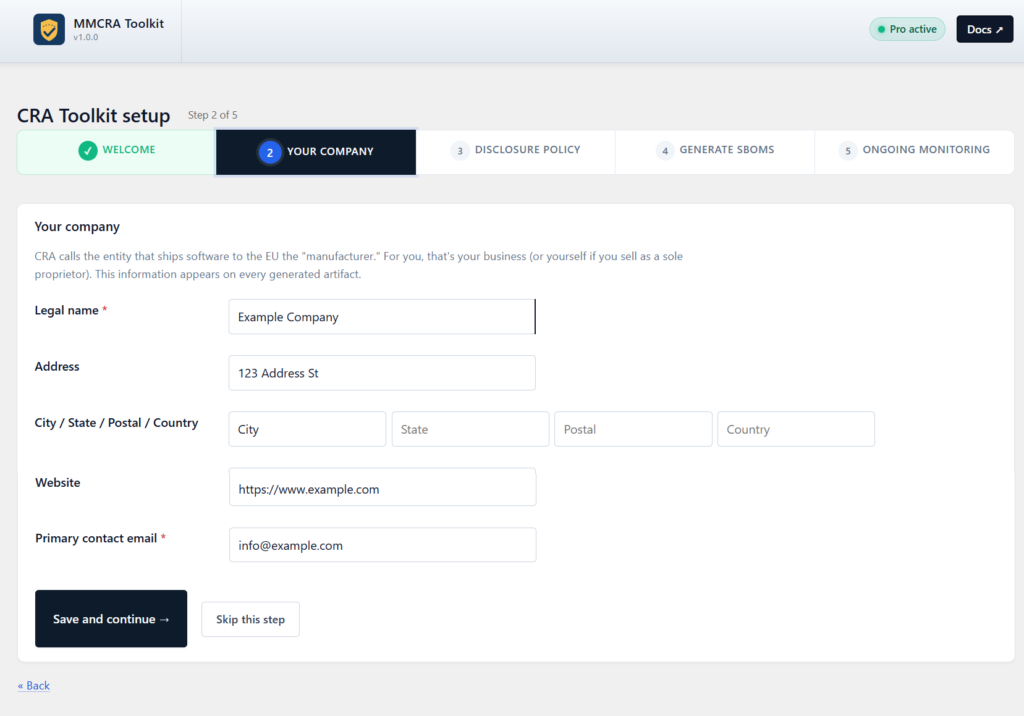
5-step Setup Wizard - Setup Wizard walks you from blank install to complete technical file in under ten minutes. Five steps, every field explained.
CycloneDX 1.6 SBOMs — Valid CycloneDX 1.6 SBOMs from any installed plugin. Pro adds SBOMs from any uploaded zip, handy for plugins you don't run on the host site.
Vulnerability Disclosure Policy - Publishable Vulnerability Disclosure Policy drafted to ISO/IEC 29147 — reporting channel, response SLA, safe harbor, scope, PGP key.
EU Declaration of Conformity - Per-plugin EU Declaration of Conformity built to CRA Annex V, fields populated from your Settings. Export HTML, print to PDF, sign, file.
OSV.dev vulnerability monitoring - OSV.dev checks every dependency against the advisory database. A Pro control: weekly cron, email alerts, and AI triage that ranks new advisories by severity. Tiered by plugins monitored.
Plugin Scanner - Plugin Scanner (Pro) reads your code for risky route registrations, capability gaps, missing nonce checks, and known anti-patterns.
One-click Compliance Bundle - One-click Compliance Bundle (Pro) packs the latest SBOM, VDP, signed DoC, scan report, and audit log into a single regulator-ready ZIP with a README manifest.
Tamper-evident audit log - Every artifact is SHA-256 hashed and recorded in a tamper-evident audit log. Pro adds CSV export of the log.
Five steps. Done in under ten minutes.
On first launch, the Setup Wizard walks you through everything: manufacturer identity, EU authorised representative (or a placeholder), Vulnerability Disclosure Policy fields, Declaration of Conformity defaults, and whether to switch on weekly OSV monitoring.
The Wizard is optional. If you'd rather jump straight to the individual settings pages, you can. Either way, you finish with a complete technical file ready to use.
cra-technical-file-example-plugin-20260526-143052.zip
├── README.md
├── sbom/
│   └── example-plugin-20260526-143010.cdx.json
├── vdp/
│   └── vulnerability-disclosure-20260524-091205.html
├── doc/
│   └── doc-example-plugin-20260526-142847.html
├── scan/
│   ├── scan-example-plugin-20260526-142901.html
│   └── scan-example-plugin-20260526-142901.json
└── audit-log/
    └── example-plugin-audit-20260526-143052.csv
One bundle. Every artifact.
Click Compliance Bundle on the dashboard and the toolkit packages the latest SBOM, the published VDP, the signed Declaration of Conformity, the latest Plugin Scanner report (both HTML and machine-readable JSON), and a per-plugin audit log CSV into a single ZIP.
A README manifest names every file with a short description and includes the license fingerprint as a watermark. This is the artifact you hand to a regulator under CRA Article 31, or to an EU customer asking for the technical file.
The bundle ships with the version of every artifact at the moment of export, plus a SHA-256 hash recorded in the audit log so the bundle's integrity can be verified after the fact.
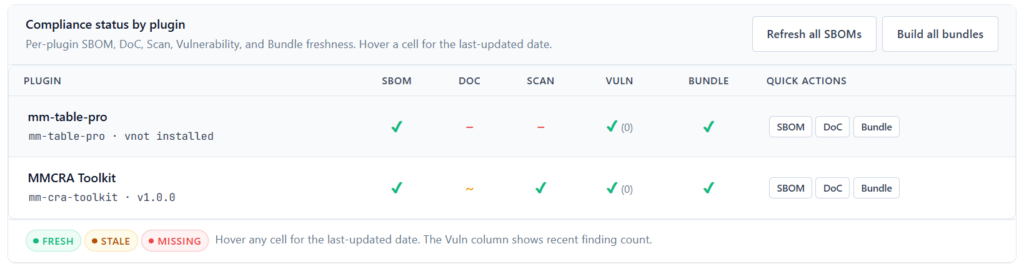
Per-plugin compliance status, at a glance
The dashboard shows the status of every required artifact for every plugin you ship. Bulk actions handle generation, regeneration, and bundling across your entire catalogue.
Deadline pressure
Why you need this before September 11, 2026
From September 11, 2026, the EU Cyber Resilience Act kicks in. If you sell a commercial WordPress plugin to even one EU customer, you're in scope, and regulators can ask for your technical file with as little as 48 hours' notice.
Fines reach €15 million or 2.5% of global turnover. Building this paperwork yourself means writing CycloneDX from scratch, learning ISO/IEC 29147, drafting Annex V boilerplate, and setting up a weekly monitoring job. MM CRA Toolkit rolls all of that into one plugin you can set up in an afternoon.
FAQs
Common questions
Is MMCRA Toolkit hosted by you, or does it run in my WordPress?
Runs in your WordPress. No external account, no subscription to a separate service, no data leaves your site. The free plugin makes no outbound calls at all; Pro’s only outbound calls are to OSV.dev for vulnerability advisory checks and to MMPlugs.com for license verification and updates.
Does the CRA apply to me if I'm not in the EU?
Yes. CRA applies to products placed on the EU market, not to developers based there. If an EU customer can buy your plugin, you're a manufacturer in scope. Non-EU developers may also need to appoint an authorised representative in the EU under Article 17.
What's the minimum I need by September 11, 2026?
A published Vulnerability Disclosure Policy (Article 13), an SBOM for every shipped product, a signed Declaration of Conformity per product, an ongoing vulnerability handling process, and the technical file ready to produce on 48 hours' notice. MMCRA Toolkit produces all of those in a single configuration pass.
Does it scan my shipped plugin, or just the WordPress install it's running on?
Your shipped plugin. MMCRA reads composer.lock and package-lock.json from the plugin folder, not from the WordPress core or other plugins on the same install. You can also point it at any uploaded zip to scan plugins not installed locally.
What format is the SBOM in?
CycloneDX 1.6 JSON. The format ENISA references most often. Compatible with OWASP Dependency-Track, GitHub Dependency Graph, and any downstream tooling that accepts CycloneDX.