

MMCRA Toolkit · SBOM

A CycloneDX SBOM for your plugin, in one click.

The Cyber Resilience Act wants a machine-readable inventory of every dependency you ship. MMCRA Toolkit reads your plugin’s composer.lock and package-lock.json and writes a valid CycloneDX 1.6 document — PURLs, licenses, supplier metadata, the lot — without you touching a schema.
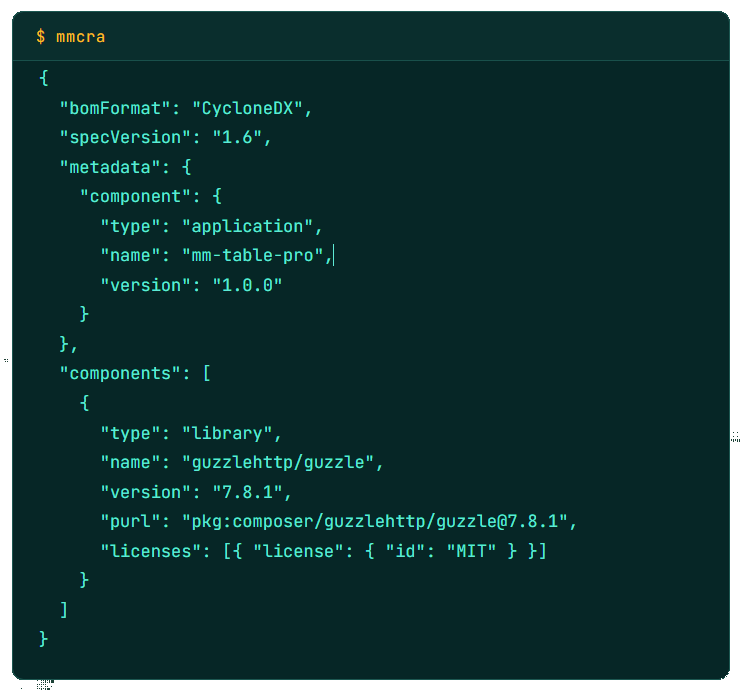
MMCRA: SBOM Cocument JSON

What it produces

A regulator-grade bill of materials, not a guess

Reads your lockfiles

Parses composer.lock and package-lock.json from the plugin folder — the exact versions you ship, not whatever is installed site-wide.

Valid CycloneDX 1.6

Output validates against the CycloneDX 1.6 JSON schema, the format ENISA references most often for CRA technical files.

PURLs and licenses

Every component carries a package URL and an SPDX license identifier, so downstream tools can resolve and audit each dependency.

Plugin header fallback

No lockfiles? The generator still records your plugin’s own component metadata from its WordPress headers, so the SBOM is never empty.

Works with your tooling

Feed the same file into OWASP Dependency-Track, GitHub’s dependency graph, or a customer’s procurement portal — standard CycloneDX in, standard CycloneDX out.

Hashed on write

Each SBOM is SHA-256 hashed into the audit log the moment it’s generated, so you can prove which version you produced and when.

Shipping · v2.5

One plugin free. Your whole catalogue on Pro.

The free plugin generates a CycloneDX SBOM for the one plugin it’s licensed to cover — enough for a solo developer shipping a single product. Pro lifts the cap to every plugin you ship and adds SBOM-from-ZIP, so you can produce a bill of materials for third-party or not-yet-installed code by uploading its archive.

Free covers 1 plugin. Pro Solo / Studio / Unlimited cover 1, 5, and unlimited plugins.

# Free
SBOM for 1 installed plugin

# Pro
SBOM for every installed plugin
SBOM from any uploaded .zip
Audit-log CSV export of every run
Regulation

Where the SBOM fits in the CRA

Annex II of Regulation (EU) 2024/2847 requires manufacturers to draw up a Software Bill of Materials covering at least the top-level dependencies of a product with digital elements. A commercial WordPress plugin sold to a single EU customer is in scope. The SBOM has to be machine-readable and kept in the technical file you can produce to a market surveillance authority under Article 31.

MMCRA Toolkit produces that document from inside your existing WordPress, stores it in wp-content/uploads/mmcra/, and rolls it into the one-click Compliance Bundle alongside your VDP and Declaration of Conformity.

Your SBOM, done before lunch.

Stop hand-writing CycloneDX JSON. Install once, click generate, and move on to the rest of your technical file.

What SBOM format does it output?

CycloneDX 1.6 JSON. It validates against the official schema and works with OWASP Dependency-Track, GitHub’s dependency graph, and most procurement tooling that accepts CycloneDX.

Does it scan my whole WordPress site?

No. It reads the lockfiles inside the specific plugin folder you choose, so the SBOM describes the code you actually ship — not WordPress core or unrelated plugins on the same install.

What if my plugin has no composer.lock or package-lock.json?

The generator falls back to your plugin’s own WordPress header metadata, so you still get a valid CycloneDX document identifying the product. Add lockfiles later and regenerate to include dependencies.

Can I generate an SBOM for a plugin I haven’t installed?

Yes, on Pro. Upload the plugin’s ZIP and MMCRA reads its lockfiles directly. Useful for third-party code or builds you ship but don’t run locally.