

Start from a template, not a blank grid.
When you create a table, pick a ready-made layout and start editing. Each template sets up the columns, styling, and a few example rows so you're not staring at an empty sheet. Clear the sample data in one click whenever you're ready.
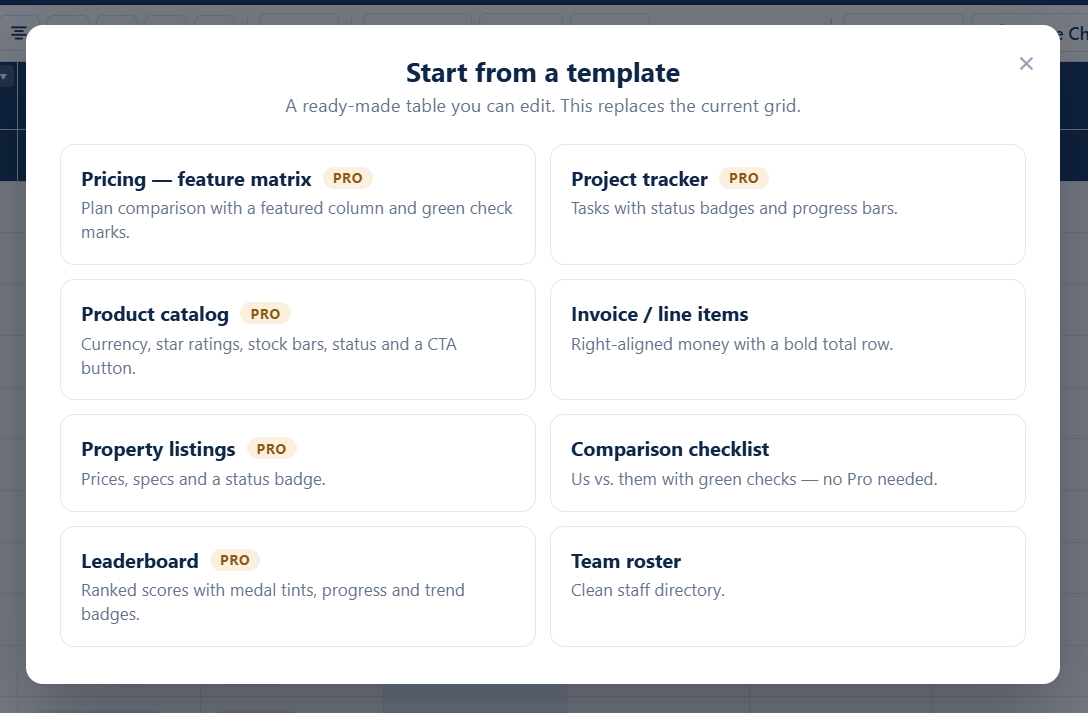
Eight starter templates
Every one is a real table you can edit, restyle, or strip back to blank.
Pricing matrix
Plan comparison with a featured column and check marks.
Project tracker
Tasks with status badges and progress bars.
Product catalog
Currency, star ratings, stock bars, status, and a CTA button.
Invoice / line items
Right-aligned money with a bold total row.
Property listings
Prices, specs, and a status badge.
Comparison checklist
Us vs. them with green checks — no Pro needed.
Leaderboard
Ranked scores with medal tints, progress, and trend badges.
Team roster
A clean staff directory.
Every template is just a normal table
There's nothing locked. A template sets the columns, colors, and example rows — then it's yours. Rename columns, change types, delete the sample data, restyle it. The template is a starting point, not a format you're stuck inside.
Build your first table in a minute
Install free from WordPress.org, or get Pro from $69/year for components, charts, AI, and live data.